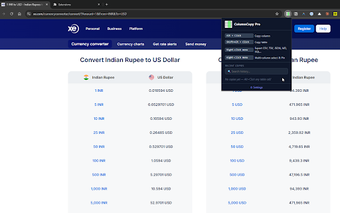
ColumnCopy Pro: pick and export HTML table columns in Chrome
ColumnCopy Pro, developed by C V VENKATESH (cvvenkateshcv), is a Chrome extension for extracting structured table data from web pages. The extension lets users select and copy individual HTML table columns or export entire tables, turning multi-column selections into spreadsheet-ready output. It also keeps a searchable history, local pinning, and built-in backups. The tool targets data analysts, researchers, Salesforce administrators, and office professionals who move web table data into spreadsheets or databases.
What is ColumnCopy Pro used for?
ColumnCopy Pro is designed specifically to extract structured data from HTML tables, not for general web clipping. Its main actions let users select individual table columns and copy or export complete tables in standard formats for spreadsheet import. This focused purpose makes the extension practical for workflows that require moving tabular web data directly into spreadsheets or databases without manual cell-by-cell copying.
How does it behave under repeated use and when storing copied items?
The extension provides a searchable history log of previously copied items and a local backup option to protect saved entries. It supports a persistent history dashboard where users can find past extracts, and the backup feature reduces risk of losing pinned items. The package is compact, approximately 137 KiB, which the developer notes helps keep its impact on browser performance low during routine use.
How does it manage privacy and where is data stored?
Privacy is handled with a design that keeps data local, the developer declaring that user information is not sold to third parties. Pinning and stored history are saved locally rather than routed to external services, and the integrated backup works within the extension to preserve pinned tables. The extension runs on Google Chrome and other Chromium-based browsers, which matches workflows already tied to that rendering engine.
ColumnCopy Pro is a practical, narrowly focused tool for table-heavy workflows
ColumnCopy Pro suits professionals who repeatedly harvest web tables for spreadsheet or database workflows, because it targets HTML table extraction and keeps copies locally. The niche focus means casual web clippers get limited benefit, and adoption is still growing so community resources are smaller. A practical next step for interested users is to test the extension on representative pages to confirm it fits each site's table structure before relying on it for bulk tasks.